---
title: "Configuring SPF record in WIX"
canonical_url: "https://www.zone.eu/support/kb/configuring-spf-record-in-wix/"
post_type: "ht_kb"
published: "2024-04-04T13:59:51+00:00"
modified: "2024-10-04T08:25:41+00:00"
language: "en"
author: "silver"
taxonomies:
ht_kb_category:
- name: "E-mail"
url: "https://www.zone.eu/support/kb-categories/e-mail-en/"
- name: "Nameserver"
url: "https://www.zone.eu/support/kb-categories/nameserver-en/"
- name: "Technical (Nameservers, DNS-records, etc)"
url: "https://www.zone.eu/support/kb-categories/technical-nameservers-dns-records-etc-en/"
ht_kb_tag:
- name: "DNS"
url: "https://www.zone.eu/support/kb-tags/dns-en/"
- name: "DNS records"
url: "https://www.zone.eu/support/kb-tags/dns-records/"
- name: "SPF"
url: "https://www.zone.eu/support/kb-tags/spf-en/"
- name: "WIX"
url: "https://www.zone.eu/support/kb-tags/wix/"
---
# Configuring SPF record in WIX
For a domain email to work properly via [WIX ](https://www.wix.com/), an email authentication DNS [SPF](https://www.zone.eu/support/kb/spf-record/) record should be added to the domain. In the case of **Wixdns.net** (WIX) name servers (NS), the corresponding authentication record must be added via their control panel.
The value of the Zone SPF record is following:
`TXT "v=spf1 a mx include:_spf.zone.eu -all"`
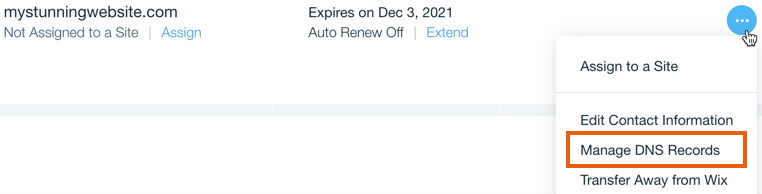
In the **WIX** control panel, you should first go to the domains view: `Domains`. Then you should click on **`Manage DNS Records`** for the desired domain.
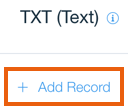
After making the appropriate selection, a new record should be added, i.e. **`+ Add Record`**, and the record type, i.e. `type`, must be **`TXT`** (do not set “type” to “SPF”).
When adding a record, the **`Host`** field must be left empty, the **`Value`** field must be filled with the value of the Zone SPF record, i.e. **v=spf1 a mx include:\_spf.zone.eu -all.**
NB! When adding an SPF entry, the WIX help article can be helpful:
Important! After adding the corresponding SPF entry, the change will take effect within **1-2 hours** (DNS propagation speed).